
Power Platform ALM in Practice: Azure DevOps Pipelines and Pitfalls
November 27, 2026 · 5 min read · Sadi Redwan

Most Power Platform projects start their release process the same way: someone exports a solution from development, downloads the zip, and imports it into test. It works for the first few releases. Then the solution grows, a second maker joins, a flow arrives in production switched off, and one Friday afternoon nobody can say which version is actually live.
We have taken a lot of Dataverse and Dynamics 365 projects through that transition. Moving to CI/CD on Azure DevOps is rarely hard because of the tooling. It is hard because Power Platform does not behave like a normal codebase. This post covers the pipeline shape that has worked for us and the pitfalls that catch teams out, often more than once.
Why Power Platform is different
In a typical application the source code is the truth and the build produces the deployable. In Power Platform the truth lives inside an environment. Tables, forms, views, apps and flows are metadata in Dataverse, created by makers through a browser. The solution is the container that turns that metadata into something you can version, ship and roll forward.
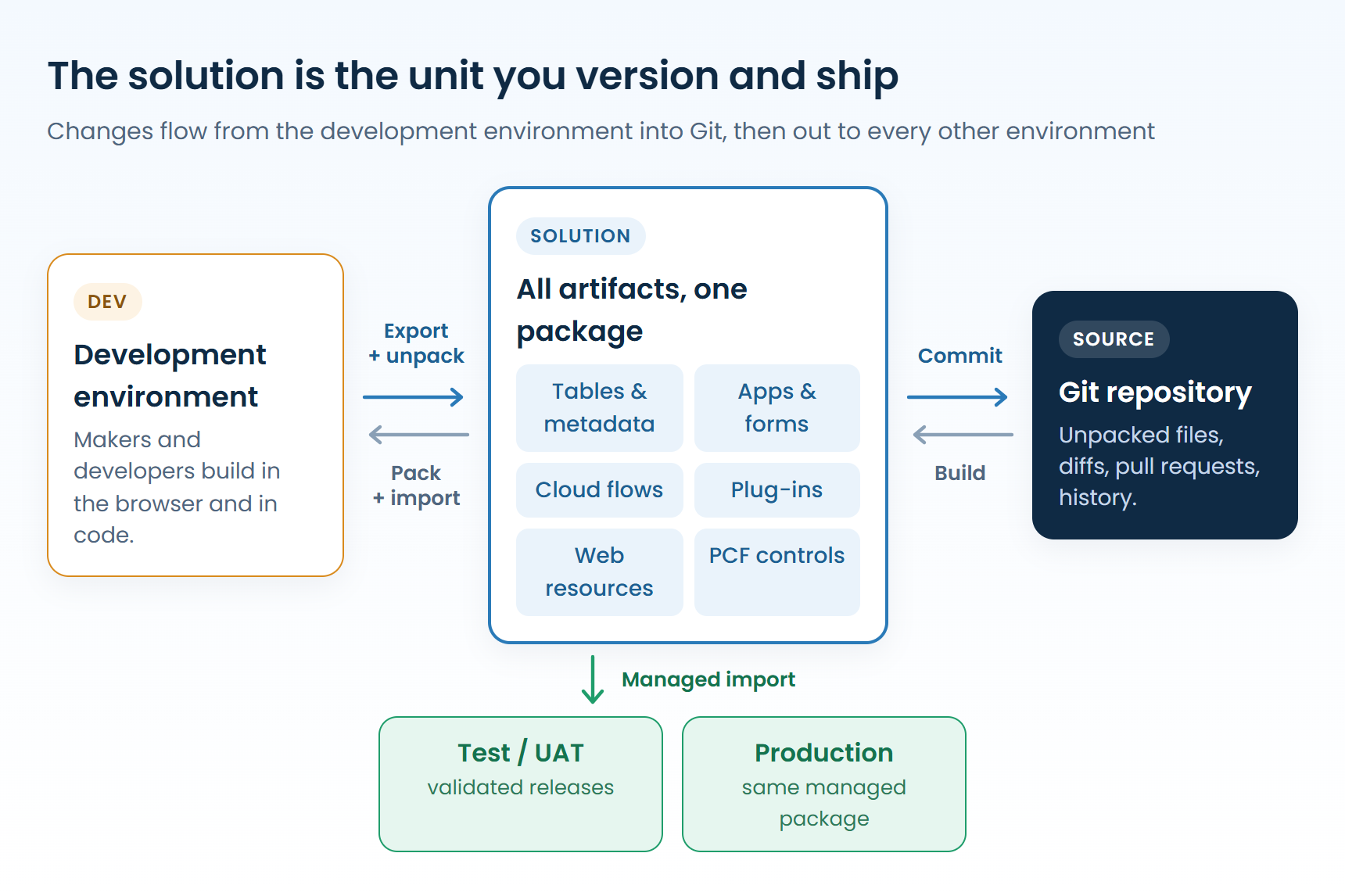
Changes flow from development into Git, then out to every other environment as one managed package.
So the pipeline has two jobs. It has to get changes out of the development environment into Git, where they can be reviewed and diffed. It also has to push a clean, tested package into every environment after that. The Power Platform Build Tools for Azure DevOps cover both with pipeline tasks around the Power Platform CLI: export, unpack, pack, checker, set version and import.
The pipeline shape that works
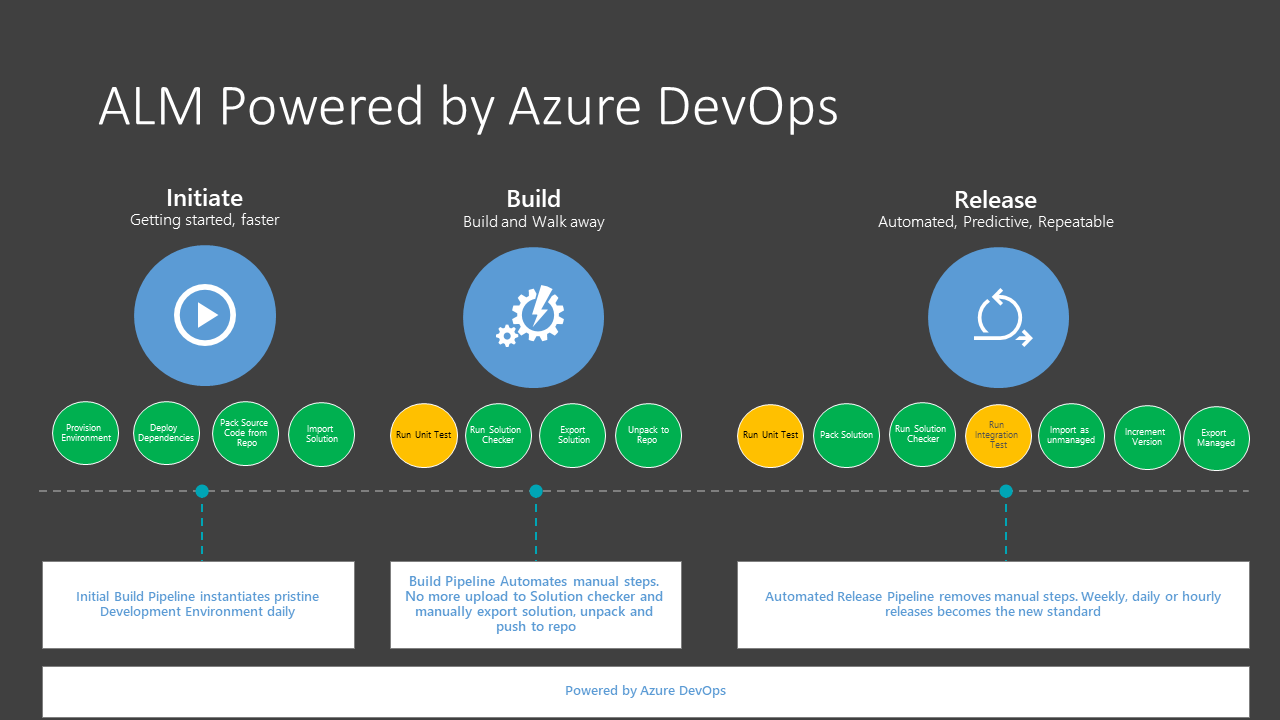
Microsoft's view of ALM on Azure DevOps: initiate, build, release. Source: Microsoft Learn.
The design we come back to is simple:
- Build. Stamp a version, export the solution from Dev as unmanaged (for Git) and managed (for deployment), unpack the unmanaged copy into the repo, and run Solution Checker as a gate.
- Artifact. Publish the managed zip together with a deployment settings file for each environment.
- Release. Import that same artifact into Test, UAT and Production, one stage at a time, each with its own service connection and approval.
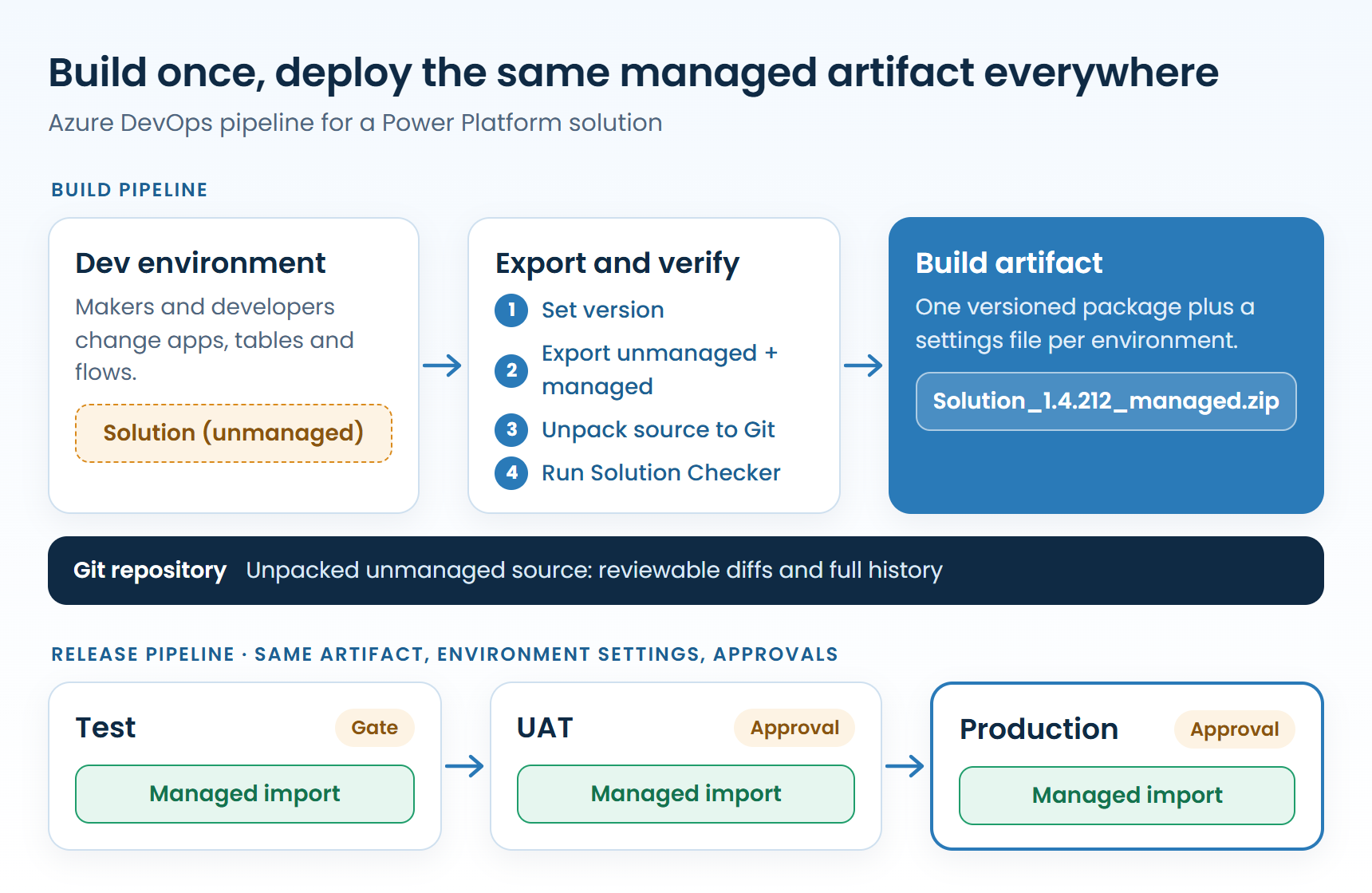
Unmanaged in development, one managed artifact everywhere else.
The rule that holds this together is build once, deploy everywhere. Test signs off a specific managed package, and production receives exactly that package, not a fresh export from Dev.
Where it goes wrong
The unmanaged layer that hides your release
The most confusing failure is a release that succeeds and changes nothing. Almost every time, the cause is an unmanaged import in the past, or someone editing a form directly in test. Dataverse resolves each component through layers. An unmanaged customization sits on top of every managed solution, so whatever you deploy underneath it never reaches the user.
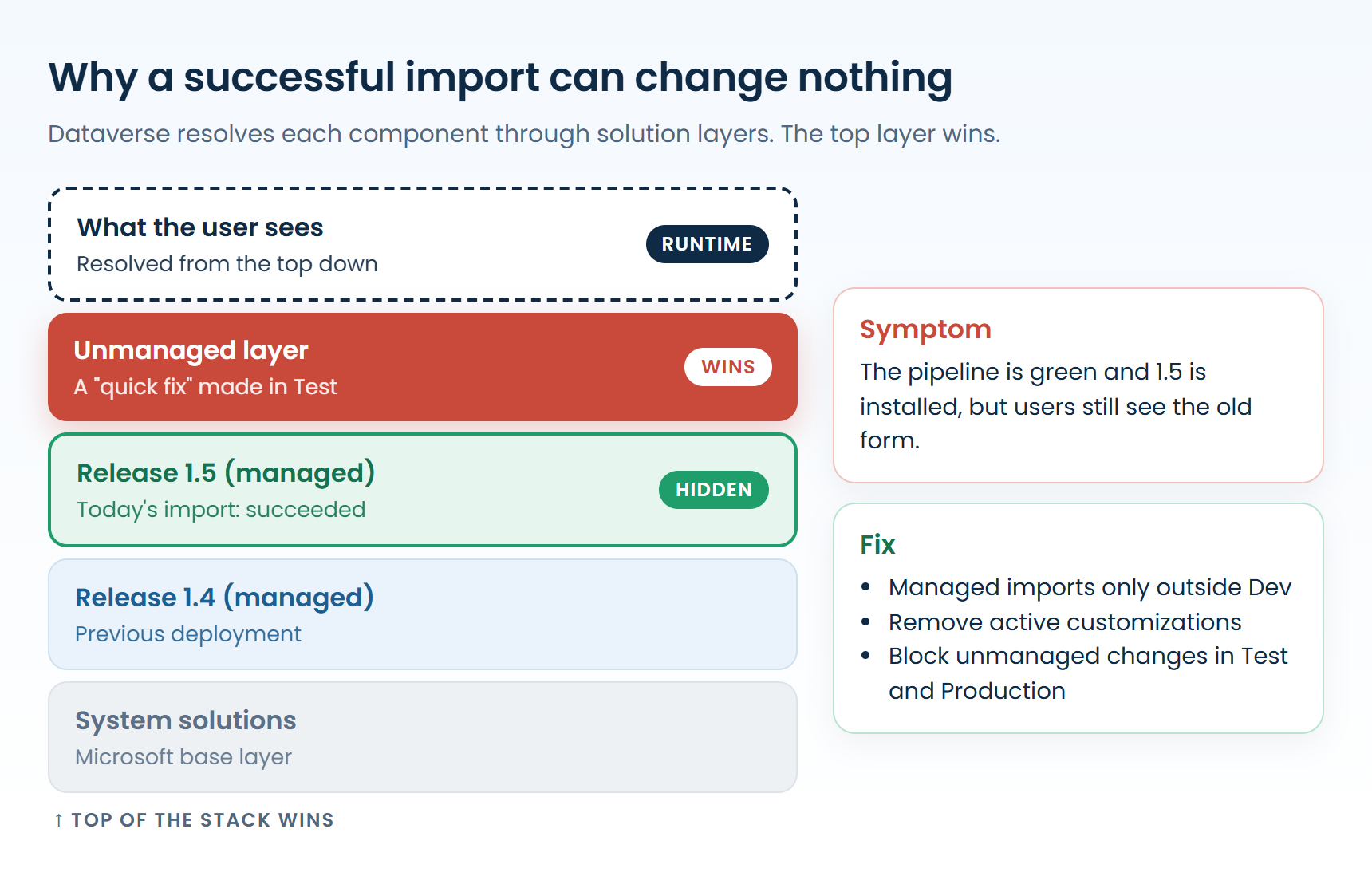
A successful import of release 1.5, hidden under an unmanaged quick fix.
Only managed solutions should leave development. Where unmanaged layers already exist, remove them component by component, then turn on the environment setting that blocks unmanaged customizations so they don't come back.
Flows that land switched off
This is the most common ticket after any release. A cloud flow activates only if every connection reference resolves to a working connection in the target, and the identity doing the import can use it. Embedded connections, unmapped references and connections owned by someone who has since left all end the same way. Use connection references everywhere, keep a deployment settings file per environment that maps each reference and environment variable, and check flow state after every release instead of assuming it.
Deleted components that refuse to leave
A normal import updates a solution. A column you deleted in Dev stays in Production. To remove components you need an upgrade: import as a holding solution and then apply the upgrade. It is slower and it deletes data in removed columns, so it should be a deliberate choice for each release, not a default nobody looked at.
Solutions that swallow everything
Adding the Account table "with all subcomponents" because you changed one form pulls hundreds of components into your solution. It also makes you the owner of things you never touched. Missing dependencies cause the opposite failure: the import stops because the solution references something the target lacks. Add only what you changed, and run a dependency check in the build.
Values and data that don't travel
Solutions carry metadata, not data. URLs, mailbox addresses and API keys belong in environment variables, with secrets in Azure Key Vault. Reference data, teams, queues and business units have to be migrated separately, by script and in the pipeline. Without that, every environment slowly becomes its own special case.
The service principal nobody planned for
The pipeline authenticates as an app registration, registered as an application user in each environment. It needs the right security role and an active business unit. Whatever it imports, it owns, including flows. Conditional access, environment IP firewalls and DLP policies can block it even when the credentials are correct. Test each service connection before the first release, not during it.
The quick fix in production
One "small change" made directly in production breaks the promise that Git and the pipeline describe what is deployed. It also quietly creates the unmanaged layer from the first pitfall. Urgent fixes still go through Dev and the pipeline, through a fast-track stage with lighter approvals if needed.
Azure DevOps or Pipelines in Power Platform?
Microsoft's in-product Pipelines in Power Platform give makers managed deployments with very little setup, and they suit low-risk citizen-developer solutions well. Azure DevOps is the stronger choice for enterprise applications. It adds source control of the unpacked solution, quality gates, plug-in and PCF builds, data migration steps, multi-stage approvals and releases that sit alongside the rest of your Azure estate. Many organisations end up using both.
Rules we keep
- One publisher and prefix per product.
- Managed only outside Dev, with unmanaged customizations blocked downstream.
- The pipeline stamps the version, and one artifact goes through every stage.
- Connection references and environment variables everywhere, with values in deployment settings files.
- Upgrade when components are removed.
- Flow state verified after every release.
Power Platform CI/CD is less about the tasks in the pipeline than about the discipline around them. Get these rules right and releases become routine.
Cover image: Growtika on Unsplash. The diagram marked "Source: Microsoft Learn" is from the Power Platform application lifecycle management documentation (CC BY 4.0).

Comments
No comments yet. Start the conversation.